 100% Free
Let's get jamming with
Jamming Player!
Capo any song, bend the tempo to your pace, and let Jamming Player estimate the key, chords, and BPM for you. The fun, free way to play along.

Seamless playlists
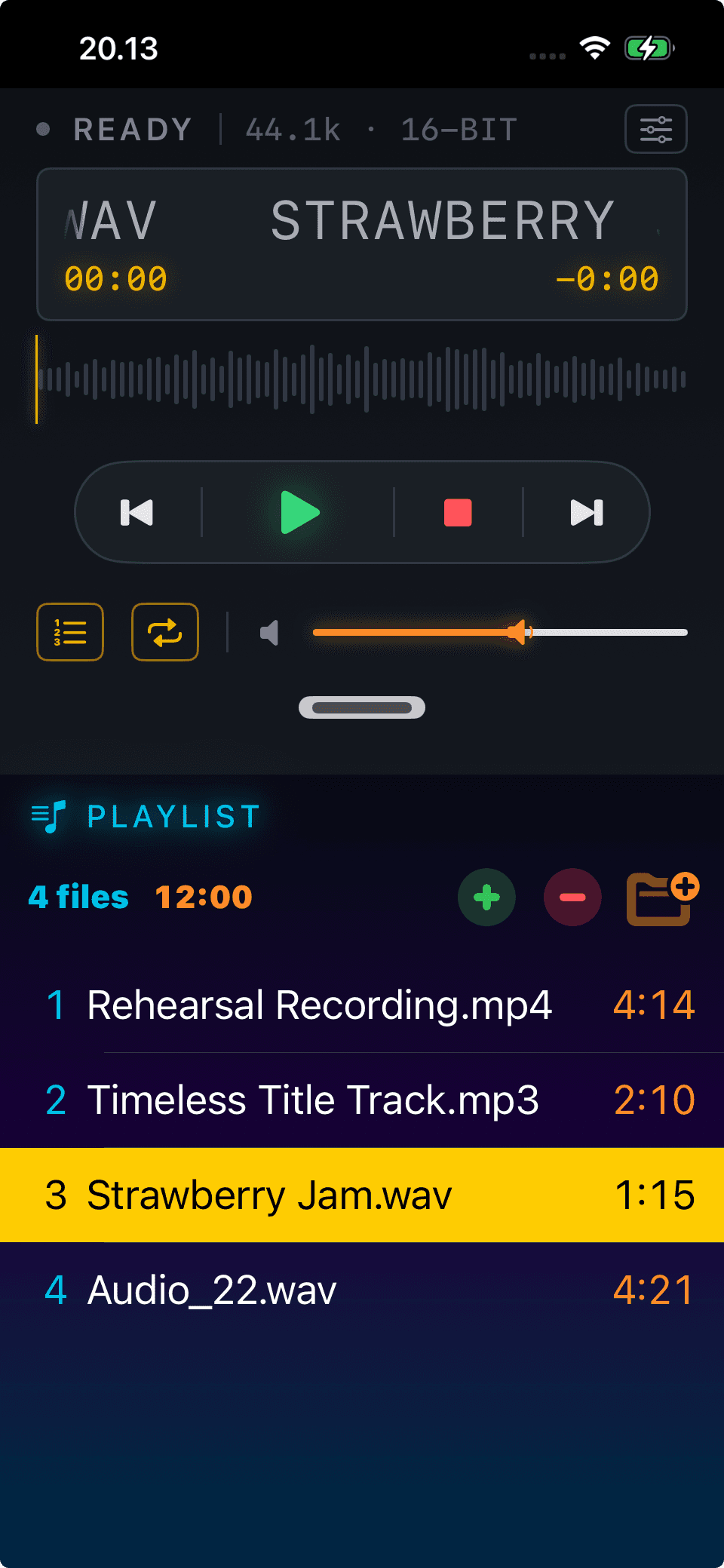
Build your playlist once and pick up right where you left off on any of your devices.
- Add a single audio file, or drop in an entire folder at once.
- Organize your jams the way you like and reorder them anytime.
- Store your files in iCloud Drive and your playlist follows you everywhere.
Sync works when:
- Your iPhone and iPad are signed in to the same iCloud account.
A player that follows your jam
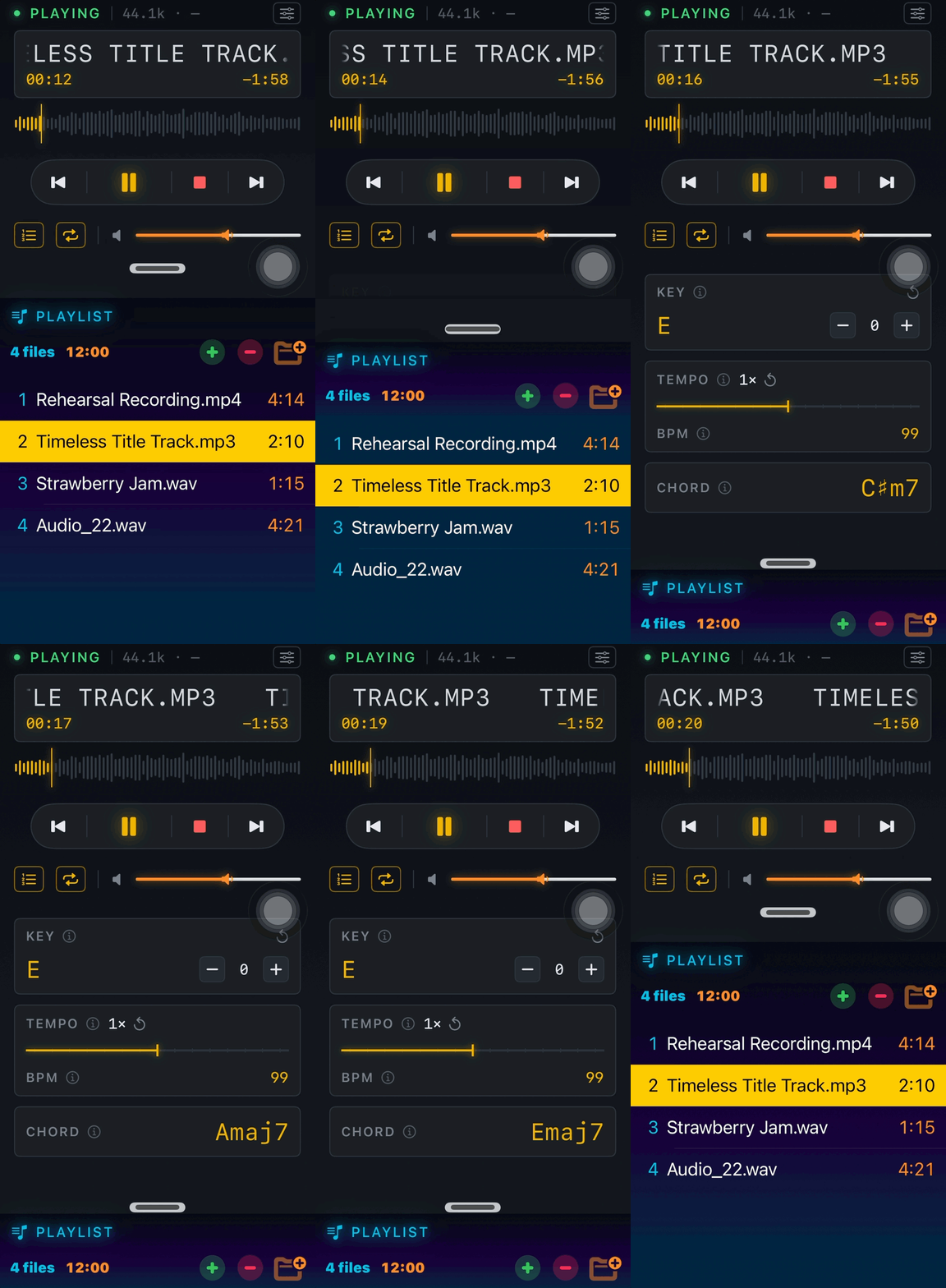
Pull the player up for the full toolkit, or tuck it away into a compact bar while you flip through your playlist.
- Capo any song up or down to find the shapes that fit your hands.
- Slow it down or speed it up to match your pace, without changing the pitch.
- Get an estimated key and chord suggestions to play along faster.
- See an estimated BPM so you can lock in with the groove.
- Keep the player compact while you browse, or expand it for full control.
Note: key, chord, and BPM detection are smart estimates to get you started. They may not always be spot on, so trust your ears too.
Start jamming today
It's completely free, with no subscriptions, no ads, and no tracking. Download it and play along.
Frequently Asked Questions
Have unanswered questions? Found bugs? Got improvement ideas? Just send it to vinamelody+jammingplayer@gmail.com
Is Jamming Player really free?
Yes, completely free. No subscriptions, no ads.
How do I add songs to a playlist?
You can add a single audio file or an entire folder. Tap Add, then pick a file or a folder from your Files app and it will appear in your playlist.
How does syncing across my devices work?
Jamming Player reads your playlists from iCloud Drive. As long as your iPhone and iPad are signed in to the same iCloud account and your audio files live in iCloud Drive, from the Settings, tap Sync Playlist. Your playlist will show up on every device automatically.
Why don't my songs sync to my other device?
Sync only works when both devices use the same iCloud account and the files are stored in iCloud Drive. Files kept only on a single device (local-only) cannot sync. Also remember to tap Sync Playlist from the Settings.
Do you copy my audio files somewhere else?
Yes — when you import a track, Jamming Player makes its own copy of the audio file. That copy lives in the app's private iCloud storage (part of your iCloud account), which is what lets your playlist appear and play on your other devices. If you're not signed into iCloud, the copy is stored privately on the device instead. Your original file is never moved, modified, or deleted — and nothing is ever sent to us or any third party.
When you remove the item from your playlist, only the app's copy is deleted (on all your devices). Your original stays wherever it was.
Does it use my iCloud storage?
Yes — the copies count against your iCloud quota, like any app data stored in iCloud Drive. Clearing the playlist frees that space.
I deleted audio files but it's not immediately gone from my iCloud files.
When you delete an audio file, Jamming Player removes its copy from your devices as they sync. This may not happen instantly on every device, especially if a device is offline, but the audio file itself is removed once that device syncs.
The app may keep a small internal deletion record for up to 30 days so your other devices know the file was deleted. This record is only sync metadata and does not contain the audio file or its contents.
Can I capo and change the tempo?
Yes. You can transpose up or down like a capo, and speed the song up or slow it down without changing the pitch.
How accurate are the key, chord, and BPM detection?
They are estimates meant to give you a helpful starting point. They are not guaranteed to be perfect, so trust your ears and adjust as needed.
What is Support the project section in Settings?
Whenever you're feeling the app is useful and generous, any amount of support is appreciated and will increase my happiness level 🥰
Do you track my usage?
Zero tracking and telemetry, my friend 🍻. And it will stay like that.
What's New in the Mix
See how Jamming Player has grown, one release at a time.
Version 1.0June 12, 2026Current
- Launched with bring-your-own-audio support for MP3, WAV, FLAC, M4A, AAC, AIFF, and ALAC files.
- Included key changes, independent tempo controls, live chord, key, and BPM estimates, plus playlist syncing across iPhone and iPad.
Privacy
Jamming Player is built with privacy first. We do not use tracking libraries, ad SDKs, or telemetry analytics to monitor your behavior.
Full privacy details
Data controller and contact
- Data controller: Vina Rianti
- Privacy contact: vinamelody@gmail.com
What Jamming Player accesses
- The audio files you choose to add from the Files app or your iCloud Drive, so they can be played in the app.
- Your iCloud Drive, so your playlist can sync across your devices.
Data stored by the app
- Your playlist and playback preferences are stored on your device and, when you choose, in your own iCloud Drive.
- Jamming Player has no backend of its own. Syncing is handled by Apple's iCloud using your personal iCloud account.
- Jamming Player does not sell your data and does not share your personal data with advertisers.
Data sharing and third parties
- We do not run user tracking or telemetry services in Jamming Player.
- Apple iCloud is used only to sync your playlist between your own devices.
- We do not use additional diagnostics or crash reporting tools beyond standard App Store and iOS system reporting.
Age audience
Jamming Player is intended for a general audience aged 13 and above.
Your controls
- You can manage or remove your files any time through the Files app and iCloud Drive.
- You can delete the app to remove locally stored playlist data from the device.
Legal jurisdiction
This privacy policy is governed by the laws of Singapore.
Updates to this policy
We may update this privacy policy as Jamming Player evolves. Material changes will be reflected by updating the Last Updated date below.
Last Updated: May 29, 2026